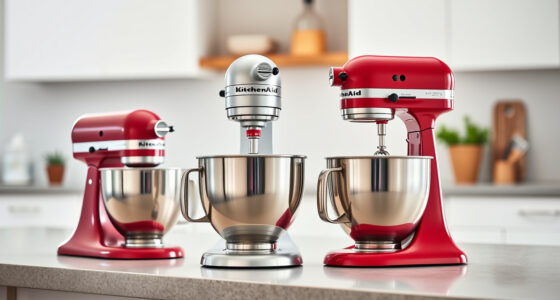
The KitchenAid Artisan Series 5 Quart Tilt Head Stand Mixer is a versatile and durable kitchen appliance designed to handle a wide range of mixing tasks. Proper maintenance is essential to keep it performing at its best and extend its lifespan. Whether you’re a seasoned baker or a casual user, understanding how to clean, troubleshoot, and maintain your mixer will ensure consistent results and prevent costly repairs.

Get kitchen staples and gadgets delivered free with Prime
- Fast, free delivery on millions of items
- Prime Video, Amazon Music and more included
- Member-only deals all year
In this guide, we’ll walk you through step-by-step maintenance routines, common troubleshooting tips, and safety precautions. From cleaning the attachments to checking the motor, you’ll learn practical, safe, and effective methods to keep your KitchenAid mixer in top condition.
Key Takeaways
| Regular cleaning is key | Keep your mixer and attachments clean to prevent buildup and ensure optimal performance. |
| Check for loose parts | Regularly inspect attachments and screws to prevent malfunction. |
| Lubricate moving parts | Apply food-safe lubricants to pivot points for smooth operation. |
| Troubleshoot motor issues | Identify common motor problems and how to fix them safely. |
| Replace worn parts promptly | Timely replacement of belts and attachments prolongs your mixer’s life. |
Cleaning and Maintaining Your Mixer
- Unplug the mixer before cleaning to ensure safety.
- Remove the mixing bowl and attachments, such as the flat beater, wire whip, or dough hook.
- Wash all removable parts in warm, soapy water. The stainless steel bowl is dishwasher safe, but check your manual for specific cleaning instructions.
- Wipe down the mixer base with a damp cloth to remove flour, splatters, and dust. Avoid abrasive cleaners that can damage the finish.
- Dry all parts thoroughly before reassembling. Regular cleaning after each use prevents buildup of dough, batter, or grease.
- Inspect attachments for signs of wear or damage, replacing them if necessary.
Lubricating Moving Parts
Ensure the mixer operates smoothly by lubricating pivot points and moving joints with a food-safe lubricant. Refer to the manufacturer’s guidelines for recommended products. Regular lubrication can prevent squeaking and reduce strain on the motor. Apply sparingly and wipe away excess to prevent contamination of your ingredients.
Troubleshooting Common Problems
- Mixer not turning on: Check the power outlet and cord. Ensure the tilt-head locks securely in place. Reset the circuit breaker if needed.
- Motor overheating or stalling: Allow the mixer to cool down if used continuously for long periods. Avoid overloading the bowl beyond capacity.
- Uneven mixing or wobbling: Confirm attachments are properly secured and the bowl is seated correctly. Balance large batches and avoid overfilling.
- Unusual noises: Inspect for loose screws, worn belts, or debris caught in the mechanism.
Replacing Parts and Upgrades
Over time, certain parts may wear out or need replacement. Common components include belts, attachments, or the pouring shield. Always use genuine KitchenAid replacement parts to ensure compatibility and safety. Upgrading attachments, like a pasta roller or food grinder, can expand your mixer’s capabilities. Follow the manufacturer’s instructions for installation to avoid damage and ensure optimal operation.
Safety Tips and Precautions
- Always unplug the mixer before cleaning or replacing parts.
- Do not immerse the motor base in water; use a damp cloth for cleaning.
- Handle attachments carefully to avoid injury from sharp edges.
- Regularly inspect electrical cords for damage and replace if frayed or broken.
- Follow manufacturer’s instructions for maintenance and repairs.
The Products in This Guide

KitchenAid Artisan Series 5 Quart Tilt Head Stand Mixer
- ✔ Dimensions: 14 x 8 x 14 inches
- ✔ Voltage: 120V
- ✔ Warranty: 1 year

KitchenAid Stand Mixer Attachment
- ✔ Size: Standard attachment size
- ✔ Weight: Approx 4 lbs
- ✔ Warranty: Manufacturer’s warranty
KitchenAid Artisan Series 5 Quart Tilt Head Stand Mixer
The KitchenAid Artisan Series 5 Quart Tilt Head Stand Mixer is built with durable metal construction and features 59 touchpoints to ensure thorough mixing. It offers 10 speeds for nearly any task, from gentle stirring to whipping. The tilt-head design provides easy access to the bowl, making cleaning and adding ingredients simple. Its stainless steel bowl accommodates small or large batches, perfect for baking enthusiasts.
Pros:
- Durable metal construction
- Versatile with 10 speeds
- Easy tilt-head access
- Large 5-quart bowl
- Dishwasher safe components
Cons:
- Can be heavy to move
- Price may be high for some
- Attachments sold separately
Best for: Home bakers and cooking enthusiasts seeking a reliable, long-lasting mixer
Not ideal for: Commercial kitchens or heavy-duty industrial use
Bottom line: A durable, versatile mixer ideal for home baking and cooking.
KitchenAid Stand Mixer Attachment
The KitchenAid Stand Mixer Food Grinder attachment transforms your mixer into a versatile meat grinder, perfect for homemade sausages, ground meats, and more. Made of durable metal with multiple grinding plates and sausage stuffer tubes, it’s a valuable addition for serious cooks.
Pros:
- Wide variety of grinding plates
- Easy to attach and clean
- Creates fresh, high-quality ground foods
- Includes sausage stuffing options
Cons:
- Requires separate purchase of mixer
- Cleaning can be a bit time-consuming
- Bulkier attachments may take up storage space
Best for: Food enthusiasts wanting to process fresh meats, fruits, or vegetables
Not ideal for: For those who do not frequently grind or process ingredients
Bottom line: A robust attachment that enhances your KitchenAid mixer’s food processing capabilities.
Frequently Asked Questions
How often should I clean my KitchenAid mixer?
It’s best to clean your mixer after each use to prevent buildup and maintain performance. Remove and wash attachments and wipe down the base regularly.
Can I use any lubricant on the mixer?
Only use food-safe lubricants recommended by KitchenAid. Avoid petroleum-based lubricants that could contaminate food.
What should I do if my mixer isn’t turning on?
First, check that the mixer is plugged in and the tilt-head is secured properly. Reset the circuit breaker if necessary. If the problem persists, inspect the power cord and internal wiring.
How do I replace a worn belt?
Consult your user manual for specific instructions. Generally, you’ll need to remove the bottom panel, loosen the motor, and replace the belt with a compatible one from KitchenAid.
Are attachments dishwasher safe?
Most attachments like the stainless steel bowl and flat beater are dishwasher safe, but always check the manufacturer’s care instructions.
Maintain Your Mixer for Years of Reliable Performance
Regular maintenance of your KitchenAid stand mixer ensures it continues to deliver excellent results and lasts for many years. Simple routines like cleaning, inspecting, and replacing worn parts can prevent breakdowns and keep your kitchen functioning smoothly. With proper care, your investment in this versatile appliance will keep baking and cooking enjoyable for a long time.
Affiliate disclosure: As an Amazon Associate we earn from qualifying purchases. Prices and availability are accurate as of the time of publishing.
Fall Picks
fall essentials
As an affiliate, we earn on qualifying purchases.