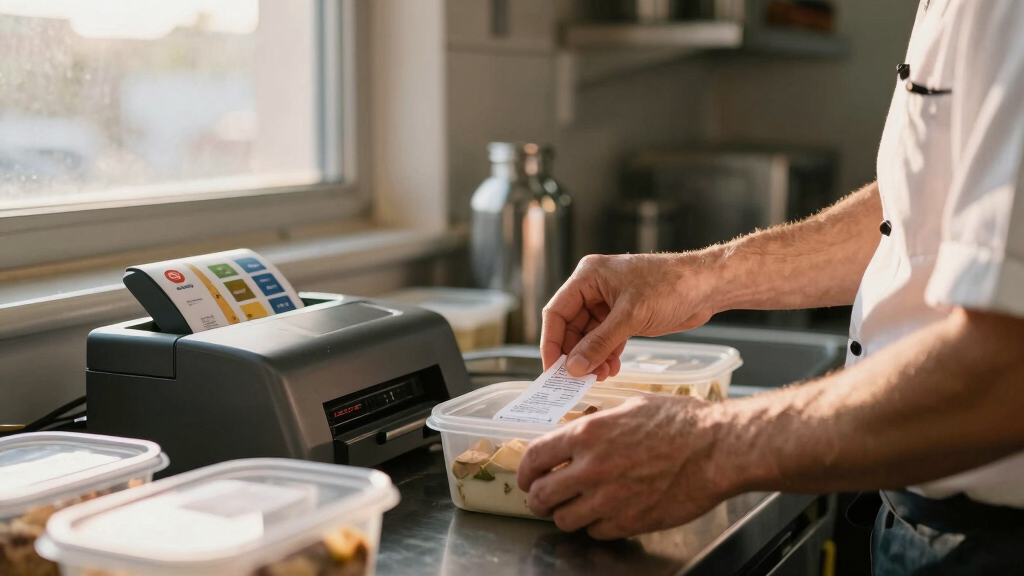

Choosing the right label printer for a prep station depends on your specific needs, including speed, label variety, and connectivity options. The Rollo USB 4×6 Thermal Shipping Label Printer stands out for its fast, inkless printing of large shipping labels, making it ideal for high-volume environments. Meanwhile, the DYMO LabelWriter 450 Twin Turbo offers versatility with two rolls and excellent speed for address and barcode labels. Each has tradeoffs: Rollo’s USB-only connection limits mobility, whereas DYMO’s reliance on specific label rolls can increase ongoing costs. Here’s what you need to know to choose between these two top contenders.

Get kitchen staples and gadgets delivered free with Prime
- Fast, free delivery on millions of items
- Prime Video, Amazon Music and more included
- Member-only deals all year
Key Takeaways
- The Rollo excels in fast, inkless printing of large shipping labels but is limited to USB connectivity.
- The DYMO offers dual rolls and high-speed label production, ideal for mixed label types in busy prep stations.
- Both printers eliminate ink and toner, reducing ongoing maintenance costs.
- Rollo is best suited for shipping-heavy environments, while DYMO works well for varied labeling needs.
- Tradeoffs include Rollo’s wired setup versus DYMO’s dependency on proprietary labels and slower print resolution.
| Rollo USB 4×6 Thermal Shipping Label Printer |  | Best for Fast, Inkless Shipping Labels | Printer type: Thermal | Print resolution: 203 × 203 DPI | Print speed: Up to 1 label per second | VIEW LATEST PRICE | See Our Full Breakdown |
| DYMO LabelWriter 450 Twin Turbo Label Printer |  | Best for Versatile Label Types and High-Speed Production | Printer type: Direct thermal | Print resolution: 300 x 300 dpi | Print speed: Up to 71 labels per minute | VIEW LATEST PRICE | See Our Full Breakdown |
| label printers for prep station | Printer type | Print resolution | Print speed | Connectivity |
|---|---|---|---|---|
| Rollo USB 4×6 Thermal Shipping | Thermal | 203 × 203 DPI | Up to 1 label per second | USB 2.0 |
| DYMO LabelWriter 450 Twin Turb | Direct thermal | 300 x 300 dpi | Up to 71 labels per minute | USB |
More Details on Our Top Picks
Rollo USB 4×6 Thermal Shipping Label Printer
The Rollo USB 4×6 stands out for its ability to produce monochrome shipping, warehouse, barcode, and custom labels without ink or toner. Its printing speed—up to one label per second—makes it suitable for high-volume prep stations that prioritize speed. Compared with the DYMO, Rollo supports larger labels up to 4.1 inches wide, but it’s limited to a USB wired connection and monochrome output, so it’s less flexible for varied label types or mobile setups. Its support for major shipping platforms and marketplaces ensures compatibility, but the lack of color printing could be a drawback for more complex labeling needs.
Pros:- Inkless direct thermal printing reduces ongoing costs
- Supports large 4×6 labels at up to one per second
- Compatible with Windows, Mac, and major shipping platforms
- Lightweight and easy to set up
Cons:- USB wired connection limits mobility
- Monochrome only, not suitable for color labels
Best for: High-volume shipping operations needing fast, reliable, inkless printing
Not ideal for: Work environments requiring color labels or wireless connectivity
- Printer type:Thermal
- Print resolution:203 × 203 DPI
- Print speed:Up to 1 label per second
- Maximum label width:4.1 inches
- Connectivity:USB 2.0
- Compatible OS:Windows XP and newer; Mac 10.9 and newer
Our verdict“This printer is perfect for fast-paced shipping environments that prioritize speed and reliability over label variety or wireless use.”
DYMO LabelWriter 450 Twin Turbo Label Printer
The DYMO LabelWriter 450 Twin Turbo offers dual rolls, allowing quick switching between label types without changing rolls. Its high speed—up to 71 four-line address labels per minute—makes it ideal for busy prep stations that handle a variety of labels, from addresses to barcodes. Compared to Rollo, it provides a higher resolution of 300 x 300 dpi, enhancing label clarity. However, it’s limited to DYMO’s proprietary labels, which can increase ongoing costs, and it connects via USB only. Its ability to support multiple label types makes it versatile, but the reliance on specific labels could be a concern for cost-conscious users.
Pros:- Two rolls allow quick switching between label types
- Supports a wide range of labels including address, shipping, and barcodes
- High-resolution printing produces sharp labels
- Fast production rate for busy environments
Cons:- Uses proprietary DYMO labels, increasing ongoing costs
- Limited to USB connection, no wireless options
Best for: Prep stations requiring high-speed, varied label production with easy roll switching
Not ideal for: Environments needing wireless setup or color label printing
- Printer type:Direct thermal
- Print resolution:300 x 300 dpi
- Print speed:Up to 71 labels per minute
- Maximum media size:2 3/10 inches
- Label rolls:2
- Connectivity:USB
- Compatible OS:Windows 7 or later; Mac OS X v10.8 or later
Our verdict“This model makes the most sense for busy prep stations that value speed and label variety, despite higher ongoing costs due to proprietary labels.”

How We Picked
To select the best label printers for prep stations, I focused on key factors: print speed, label versatility, connectivity options, ease of use, and ongoing costs. I prioritized models that excel in high-volume, fast-paced environments, especially those supporting common label sizes and formats. I also considered compatibility with popular operating systems and shipping platforms, as well as user feedback on durability and reliability. This approach ensures that each recommendation offers a clear advantage for prep station workflows, with tradeoffs clearly explained.
| label printers for prep station | Printer type | Print speed | Connectivity | Compatible OS |
|---|---|---|---|---|
| Rollo USB 4×6 Thermal Shipping | Thermal | Up to 1 label per second | USB 2.0 | Windows XP and newer; Mac 10.9 and newer |
| DYMO LabelWriter 450 Twin Turb | Direct thermal | Up to 71 labels per minute | USB | Windows 7 or later; Mac OS X v10.8 or later |
Factors to Consider When Choosing Best Label Printers For Prep Stations
Selecting the best label printer for your prep station involves balancing speed, label flexibility, and setup convenience. Key considerations include the volume of labels you need to produce, the types of labels (shipping, barcode, address), and whether you prefer wired or wireless connectivity. Compatibility with your existing systems and ongoing costs, such as proprietary label supplies, also play critical roles. Below, I break down what to look for in each category to help you make an informed choice.Speed and Volume
If your prep station handles a high volume of shipments daily, a fast printer like the Rollo is essential. It can produce up to one large label per second, streamlining large shipping tasks. For mixed labeling needs with varied label sizes and types, the DYMO’s high-speed output (up to 71 labels per minute) ensures you stay efficient without bottlenecks.
Label Versatility
Consider what types of labels are most common. The DYMO offers versatility with address, barcode, and file folder labels, thanks to its dual rolls and high resolution. Rollo’s support for large shipping labels makes it ideal for logistics but less adaptable for other label styles. The choice depends on whether your prep station requires a broad range of label formats or primarily shipping labels.
Connectivity and Ease of Use
Wired connections like USB are straightforward but limit mobility. Rollo’s USB-only setup is simple, yet less flexible if you prefer wireless or network printing. DYMO’s reliance on USB can be a drawback if you want a more flexible workspace, but it generally offers plug-and-play ease. Think about your setup—if mobility or multiple workstations matter, a different connection type might be necessary.
Ongoing Costs
Both printers eliminate ink and toner, saving money long-term. However, Rollo’s larger labels can be more expensive per label if used extensively. DYMO’s proprietary labels can also add up, especially if your volume is high. Balance your label needs with supply costs to find the most economical fit for your operation.
Frequently Asked Questions
Can I use these printers with my existing shipping platform?
Yes, both the Rollo and DYMO are compatible with major shipping platforms like ShipStation, Stamps.com, and others. Rollo supports Windows and Mac, and integrates smoothly with most online marketplaces, making it a flexible choice for high-volume shipping workflows.
Are these printers suitable for color labeling?
Neither the Rollo nor the DYMO uses color printing; both are monochrome thermal printers. If color labels are necessary, you will need to look for different models that support color printing, as these are designed primarily for black-and-white shipping and barcode labels.
How important is connectivity type for my prep station?
Connectivity affects workflow flexibility. The Rollo’s USB-only setup is simple but limits placement options. The DYMO also uses USB, which is reliable but less adaptable for multi-location setups or wireless environments. If mobility or multiple stations are priorities, consider models with Wi-Fi or Ethernet options.
Will I need special labels for these printers?
While the Rollo supports standard 4×6 thermal labels, it can handle custom sizes within its width limits. The DYMO prefers its proprietary labels for optimal performance, which may increase ongoing costs. Check compatibility with your preferred label supplier before choosing.
What is the maintenance like for these printers?
Both printers are low maintenance because they eliminate ink and toner. Regular cleaning of the print head and replacing the label rolls are the main tasks. Rollo’s simpler design may be slightly easier to maintain, but overall, these models are durable and reliable for daily prep station use.
Conclusion
If your prep station primarily handles high-volume shipping labels and speed is critical, the Rollo USB 4×6 Thermal Shipping Label Printer makes a strong choice, despite its limited flexibility and wired setup. For those needing more label versatility, faster production of varied labels, and the convenience of dual rolls, the DYMO LabelWriter 450 Twin Turbo offers a compelling package, though with higher ongoing supply costs. Overall, your decision should match your label types, workflow speed, and setup preferences—prioritizing speed and simplicity or versatility and expandability.